Eyesonic Password Reset
To reset an Eyesonic camera/recorder password, you must provide Eyesonic model number and serial number. A forgotten password for a device is generally not covered by the warranty, our hardware password reset services are only available for a maximum of 5 years from date of the purchase. Effective January 1, 2026, we charge $300.00CAD plus tax for a one-time secure code to reset specific cameras and DVRs/NVRs. We accept payment by credit card only.
To reset the password on your Eyesonic Recorder or Camera:
1. Ensure all devices are under the same network
2. Reboot the recorder and/or cameras.
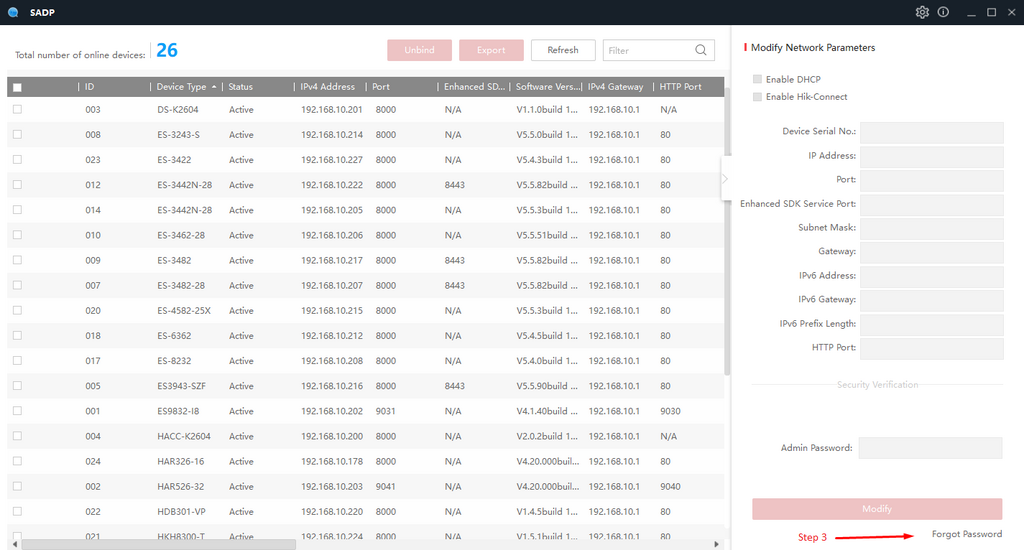
3. Right click the SADP Tool icon on desktop, and run it as Administrator, select the device that needs the password reset, and click “Forgot Password” on the right hand corner of the screen.
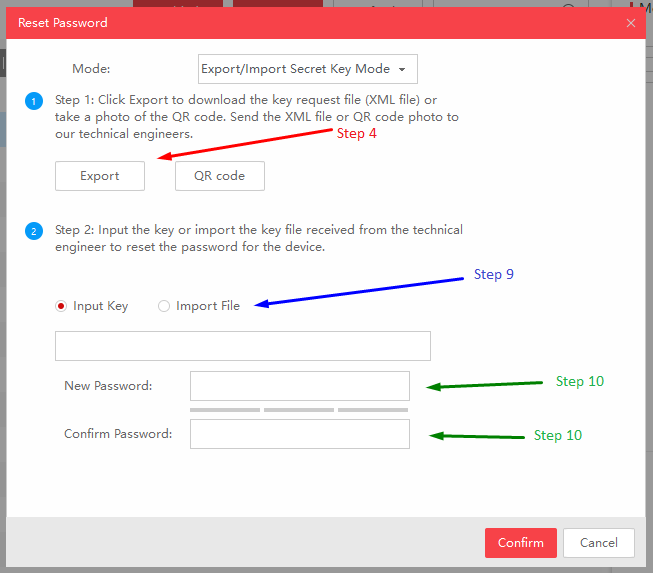
4. Click the “EXPORT”, and save the *.xml file onto desktop or any folder you wish to.
5. After exporting the *.xml file, please do not close the SADP Tool, and do not power cycle the devices.
6. Email the exported *.xml file to tech@eyesonic.com. This process may take 5 minutes to an hour.
7. Once we receive your password reset email, we will process the reset, and send you a new file.
8. Once you receive the new file in email, save the attachment onto your computer.
9. Go back to SADP Tool, in STEP 2, click the “IMPORT FILE”, and import the file we sent you.
10. Enter the new password you wish to use, and check mark the “RESET NETWORK CAMERA’S PASSWORD”.
11. The reset file is valid for 24 hours only.